
What is a Zotero Web Library?
The T-Rep Literature Repository is maintained using the Zotero platform – an external, open-source service for reference management. Anyone can browse the T-rep group library but to contribute, edit, and organize literature entries, you must first create Zotero account and join the T-Rep group. Full instructions on how to this are provided below.
In our T-rep Web Library one can find references that provide profound insights into tactile graphics design and related fields. Our library includes references listed in the Knowledge Base articles. You can access the T-Rep Web Library here: T-rep | Zotero
Please note that Zotero is an external service and we are unable to modify its structure to improve accessibility. We are aware of some accessibility issues, including screen reader compatibility. Thus, for those who prefer not to use Zotero, we will periodically publish a downloadable CSV backup of the library on our website.
Instructions for joining the T-rep Zotero group
To join the repository, you will need first need to create a fee Zotero account using this link (not obligatory if you already have an account): Create a free Zotero account. To streamline the registration process, your Zotero username should match your username on the T-Rep platform. After creating the account, you will be asked to click the verification link sent to the e-mail address provided during registration.
After logging in, you will need to join the T-rep Zotero group. Please open the T-rep group page on Zotero using the following link: T-rep group page on Zotero and hit the join button (see image below). The join request will be sent to group admins that must approve it – this is why it is important to use the same logins for both T-rep repository and Zotero account. Once your request is approved, you will gain permission to edit and contribute to the repository.
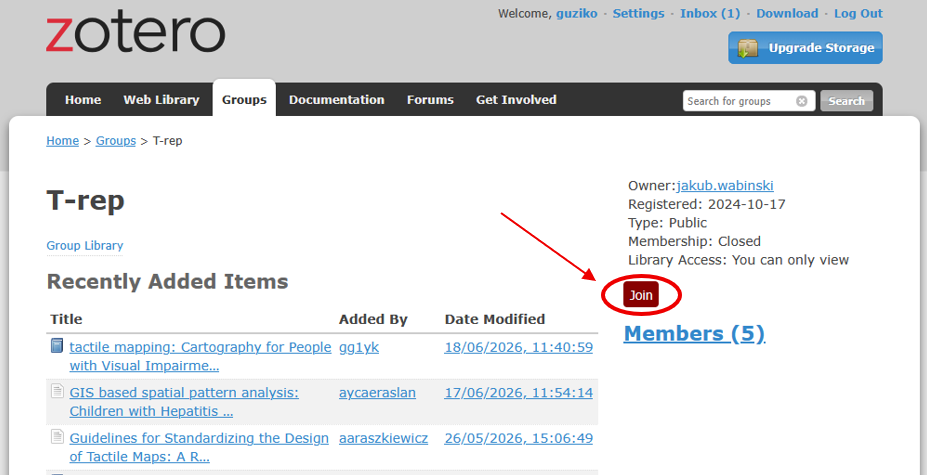
Too add a new entry to the Web Library click the New Item button and provide all the details manually or click Add By Identifier to automatically fill the metadata by providing one of the identifiers such as DOI or ISBN. Please refer to the guidelines below before contributing to the Web Library.
Good Practices
When adding new literature to the repository, please use the recommended tags listed below to describe your entries. They can be used to filter the library to find the most relevant references on a given topic.
| Tag | Description |
|---|---|
| Core: Design principles | Literature focusing on the rules, theories, guidelines, or cognitive aspects of designing effective representations. |
| Core: Production & Tech | Works detailing the materials, hardware, software, or physical manufacturing methods used to create tactile graphics. |
| Core: User testing | Research, evaluations, or behavioral studies involving direct feedback and interaction from study sessions. |
| Subject: Thematic maps | Maps that convey specific spatial data, geographical concepts, or topical information. |
| Subject: Orientation & Mobility maps | Maps and materials designed for O&M training, route-finding, transit systems, and environmental orientation. |
| Subject: Architecture & Built environment | Floor plans, room layouts, emergency exit routes, and localized structural spaces. |
| Subject: STEM & Creative graphics | Non-map visual media, such as science diagrams, charts, artwork, illustrations, everyday objects. |
| Format: Research & Case studies | Peer-reviewed papers, academic handbooks, literature reviews, localized field reports, and project documentations. |
| Format: Standards & Policy | Official regulations, institutional guidelines, legal requirements, or universally recognized best practices. |
When adding new literature to the Web Library please follow these guidelines:
- Use clear and consistent tags.
- Avoid creating duplicate entries.
- Add complete bibliographic information whenever possible.
- Use English for titles, tags, and descriptions when available.
- Verify that uploaded resources are legally shareable before attaching files.
Need Help?
If you experience problems joining the group or accessing the repository, please contact the T-Rep administrators using the following e-mail address: trep@wat.edu.pl or refer to video tutorials available on the Internet.